Friday, 27 April 2012

How to cause a Native OOM

Why would you want to do that? - a java.lang.OutOfMemoryError (OOM) is a bad thing. A native OOM error is even worse because it means that the JVM has no more memory for its own internal purposes and  results in the immediate death of the Virtual Machine, so in most situations you would not want to cause one deliberately.

In our case, we have a good reason to want to cause one - we have been seeing very occasional native OOM errors with part of our application. They are so rare that they are proving very difficult to diagnose. We would like to improve our monitoring to capture better data for diagnosis but to do so, we need to be able to test our monitoring.

Causing a Java heap OOM is pretty easy - just give your virtual machine a smallish heap size using the -Xmx switch and write some Java code that allocates lots of big Strings, populates them with random content (to defeat optimisations like interning) and stores them in a collection so that there is always a reference to them. As I've said previously, diagnosing these issues is a fairly well understood process, the usual solution being to get a heap dump using a switch such as -XX:+HeapDumpOnOutOfMemoryError and then using a tool such as Eclipse MAT to analyse the contents of the dump.

Causing a native OOM is less straightforward but there are ways to do it. A very comprehensive article on the subject of Native OOM errors can be found on the IBM site. This article also has some sample code which causes a native OOM by using some native code and JNI to allocate space in the native heap using malloc. It also suggests another way to chew up the native heap which doesn't need native code, so this is the way I did it. The java.nio.ByteBuffer class includes a method which allows the caller to allocate a 'direct' buffer which exists in the native heap. Here is a fragment of my code which does this...

private ByteBuffer createBuf() { 
    ByteBuffer bb = ByteBuffer.allocateDirect(BUFFSIZE); 
    int idx = 0; 

    while (idx < BUFFSIZE) { 
        Long l = new Long(r.nextLong());   // r is a java.util.Random
        bb.putLong(idx,l.longValue()); 
        idx += 1024;
    } 
    return bb; 

Call this enough times in a loop and keep the resulting references in a collection and you have created your own native memory leak. I found when testing this that I need to be careful to run it only in a 32 bit JVM on a machine with plenty of RAM, otherwise it won't hit the OOM error but it will use up all of your system's memory to the point where the system starts page thrashing. Don't try this on a production box!

Armed with this I was able to test questions like whether the -XX:+HeapDumpOnOutOfMemoryError switch will produce a heap dump for a native OOM. The answer is 'no', at least on Java 1.5.0_22.

Wednesday, 29 February 2012

Don't be Average

I've commented previously in these pages on the usefulness of the Oracle AWR and ASH reports but they are not the perfect answer to many questions. One of their limitations is that they present average figures over a period of time. If we are not very careful then we might start to believe that the average numbers are the whole story. Sometimes they are not.

One of my projects has had a long-standing performance issue with some Oracle code that has been very difficult to crack. One of the main challenges was that we did not have a detailed understanding of the problem. The information in AWR and ASH appeared to have a circumstantial connection to the problem but didn't really suggest how we could solve it. Our attempts to replicate it in a test environment were also unsuccessful - our tests always ran at least 10 times faster than the production system, even on a full-sized database.

This is a typical section of an AWR report from this issue:-


This shows the PL/SQL call (7q17xs6wcbra6) that was the subject of the problem plus another query (8x5z8zszym698) which always seemed to appear high in the AWR list whenever the PL/SQL call was busy. It was clear that there was a huge number of executions of the SQL, but was this the cause of the problem? As it turned out, the answer was 'no'.

The key to improving our understanding of the problem was to get away from looking at averages. The first step in this direction was to use CA Wily Introscope to look at the same PL/SQL calls from the WebLogic side. Looking at a quiet period in the early morning hours, this is what we saw:-


The graph shows that there is a repeating pattern consisting of a handful (usually 2-4) of calls which complete in less than one second followed by a single call that typically takes 30-40 seconds. This was a crucial piece of information which we had been missing. With this knowledge we were able to look at the business task that the procedure was doing and understand the pattern. For those interested, the system was working on a hierarchy of circuits. Deletion of the child circuits was very fast but deletion of the parent circuit required a full check of the hierarchy and was much slower.

Having identified the calls which took a long time we also extended the analysis by using SQL Trace to watch one of these and proved that the averages for the SQL operation were equally misleading for the same reason.

This understanding also allowed us to see what was missing from our test scenario and reproduce the issue in the test environment. Finally the understanding that we had gained allowed us to work with our supplier and find a fix for the issue.

Below is a graph from Wily for the past month showing the average response time of the PL/SQL call before and after we applied the fix. The improvement speaks for itself.

Wednesday, 30 November 2011

Using Jstat with the CMS Collector

Several months back I was investigating high CPU utilisation on a customer system. One factor that I noticed was that the Concurrent Mark Sweep garbage collector on one of the Java 5 JVMs seemed to be using 100% of a CPU for much of the day. Checking the GC log file, I found that during this period the CMS collector was running almost continuously.

We also use jstat to monitor the GC behaviour because its output is much easier to interpret than the GC log. Jstat showed total GC times much lower than those shown in the GC logs. I also noticed that the number of 'full GCs' reported by jstat frequently increased by two or a larger even number and that odd numbers appeared only rarely and for short periods of time.

So what does this mean? Why does jstat apparently disagree with the information from the GC logs and why does it seem to report that full collections occur in pairs?

Although I've never seen the answer documented anywhere (no doubt some kind soul will now point it out to me), I had a hunch that I knew what it was. My theory was that jstat was reporting just the application pause time, not the total execution time of the collector.

So I set out to try to prove or disprove my theory by running a simple test application to exercise the java heap and collecting both the GC log file (-verbose:gc -XX:+PrintGCDetails -Xloggc:gc.log) and the jstat (-gcutil -t) output for comparison.

I also did a little reading about the CMS collector to help me to identify the application pause time in the logs. This told me that each CMS cycle causes two application pauses - one for the 'initial mark' phase and one for the 'remark' phase.

Here is the jstat output:-

E:\source\memstress>jstat -gcutil -t 3136 10s

Timestamp S0 S1 E O P YGC YGCT FGC FGCT GCT
13.4 0.00 0.00 58.11 43.79 9.73 8 0.440 0 0.000 0.440
23.5 0.00 0.00 3.35 72.78 9.77 15 0.848 6 0.078 0.926
33.5 0.00 0.00 37.99 72.60 9.77 16 0.896 12 0.313 1.208

So between 13.4 seconds and 23.5 seconds of uptime, jstat reports 0.078s of full GC time.
The GC log is too verbose to reproduce here, even for this simple test, but the relevant messages for the pause phases were:-

15.410: [GC [1 CMS-initial-mark: 223173K(408576K)] 223672K(524224K), 0.0001739 secs]

[1 CMS-remark: 245213K(408576K)] 329218K(524224K), 0.0307485 secs]
19.074: [GC [1 CMS-initial-mark: 274783K(408576K)] 276925K(524224K), 0.0001132 secs]
[1 CMS-remark: 274783K(408576K)] 335949K(524224K), 0.0313580 secs]
21.232: [GC [1 CMS-initial-mark: 287928K(408576K)] 287928K(524224K), 0.0001128 secs]
[1 CMS-remark: 310245K(408576K)] 314122K(524224K), 0.0157990 secs]

So there were three CMS collection cycles in the tenured generation during the 10 second interval covered by the second line of jstat output. This corresponds to six pauses, which is what jstat reports as the 'Full GC count'.

Adding up the pause times, I reached a figure of 0.0779 seconds which agrees nicely with the 0.078 seconds reported by jstat.

So… when used with the CMS collector, jstat seems to report the number of application pauses for garbage collection and the amount of time for which the application was paused. The pause time will probably be much lower than the total amount of GC execution time.

Monday, 31 October 2011

Things That go Dead in the Night

Happy Halloween.

This post will be brief. Many people will think that it's a statement of the obvious but it's amazing how much time can be wasted on issues like this, especially in large organisations.

Sometimes we see systems behave rather strangely during performance tests and the teams managing the tests can sometimes be very inventive in their explanations of the issue. This particular issue has crossed my desk a couple of times (too many) in recent weeks and has been presented as 'a strange unexplained issue', 'file corruption', 'network issue' or 'SAN failure'.

Without building up any further mystery or invoking the supernatural, the answer was simple - the file system was allowed to become full. This can cause all sorts of interesting and varied problems to your system and the execution of any tests. In some cases it will fail completely, in others it might continue almost without anything appearing to be wrong and there are any number of variations in between these extremes.

One common factor is that it is quite normal for there to be no helpful error message like 'disk full' visible because often the file system that becomes full is the one being used to write the log file. This is where the creativity comes into play - people don't see an obvious error, so their imagination gets to work.

Scheduled housekeeping and other such automated cleanup solutions can add to the fun because they can sometimes free up space before somebody notices the problem... so then people may tell you that they are certain that the disk wasn't full because it isn't full now.

So if your test goes dead in the night, either temporarily or permanently, please do check your disk space monitoring (you do monitor your disk space utilisation don't you?). Alternatively, scrutinise your log files very carefully - are there any strange 'silent' periods that should contain messages?

Don't have Nightmares.

Wednesday, 28 September 2011

And the Second Prize Goes To...

I've written here before about the virtues of Eclipse MAT for doing heap analysis but I recently encountered a situation in which I couldn't persuade it to give me the answers that I really needed.

I was analysing a set of heap dumps from an application and MAT's leak suspects report showed me that circa 300Mb of heap space was being retained by a single object. The object in question was a metadata manager, so it was well known that this object would retain a big chunk of heap space. This overhead was fixed size, and so not really of interest. The report categorised everything else in a single bucket as 'other', which wasn't much help.

I really needed to know about the most significant objects that were retaining space outside of the retained set of the metadata manager. While it's possible to explore around using MAT views like the histogram and come up with some answers, I didn't feel that this was a very methodical approach and it would be quite easy to miss something important.

I realised that the problem could be helped by applying a little simple set theory - what we are interested in is how a histogram or retained set looks after subtracting the retained set of the number one leak suspect. This is very simple to do, but very repetitive - an ideal job for a script, so that's what I wrote.

So at the bottom of the post is a perl script that will read two files saved as CSV from either the MAT histogram or retained set views and print the result of the subtraction in CSV format to its output. Some views don't automatically calculate the retained size, so you need to select the rows and ask MAT to do at least the minimal retained set calculation before saving the CSV. If you only speak Windows, then you can use the script by installing a suitable perl implementation - I usually use ActiveState's ActivePerl.

I managed to use this quite successfully. I started by subtracting the retained set of the metadata manager from the overall histogram. By continuing to subtract more 'suspects' from the result, I was able to identify the second, third and fourth placed consumers of heap space in my dump files, which I felt was going far enough.

Finally, the script... unfortunately Blogger doesn't seem to allow attachments.


# perl script to subtract one Java retained set from another.
# Retained sets or histograms can be saved in CSV format from Eclipse MAT
# The retained size is required, so ask MAT to calculate it if it is missing
#
# usage: perl subtract-retained.pl .csv .csv [.csv]...
#
# Andy Carlson
# http://threeturves.blogspot.com/
# September 2011
#
use strict;

my ($basefile) = shift;
my (%count,%shallow,%retained,%loaders);
my ($lineno) = 0;

# read the baseline histogram
open (HIN,$basefile) || die;
while () {
$lineno++;
next if ($lineno == 1);
next if (!$_);
my ($class,$count,$shallow,$retained) = split (/,/);

if (!$retained && ($retained ne '0')) {
warn "warning: no retained size for $class at $basefile line $lineno - skipping remainder of file";
last;
}

$loaders{$class}++;
$count{$class} += $count;
$shallow{$class} += $shallow;
$retained{$class} += $retained;
}
close HIN;

# now read one or more retained sets and subtract from the base histogram
while (1) {
my ($rsetfile) = shift;
last if (!$rsetfile);
open (HIN,$rsetfile) || die;
$lineno = 0;
while () {
$lineno++;
next if ($lineno == 1);
next if (!$_);
my ($class,$count,$shallow,$retained) = split (/,/);
if (!$retained && ($retained ne '0')) {
warn "warning: no retained size for $class at $rsetfile line $lineno - skipping remainder of file";
last;
}
$count{$class} -= $count;
$shallow{$class} -= $shallow;
$retained{$class} -= $retained;
}
close HIN;
}

# produce the output
print "class,objects,shallow heap,retained heap,loaders\n";
my ($class);
foreach $class (sort keys (%loaders)) {
print "$class,$count{$class},$shallow{$class},$retained{$class},$loaders{$class}\n";
}

Thursday, 18 August 2011

Why does a query change plans when the stats have not changed?

I was recently asked to investigate a performance issue on one of our customer's production systems. Some comparative analysis of AWR reports between 'good' and 'bad' periods showed that the queries being run by the part of the application that had problems were circa 50% slower but what really caught my attention was an unrelated query that had jumped from about 8th place in the AWR response time 'offenders' list up to first place. It was also accounting for huge amounts of logical I/O and a fair bit of physical I/O.

Looking in more detail at this query we got AWR SQL reports that showed its performance during the 'good' and 'bad' periods. These showed that a different plan was in use during the 'bad' period. This plan had a table scan whereas the other plan used an index lookup. It has to be said though that neither plan can have been all that great - if the index plan was 'good' then the query shouldn't have been in the AWR top 10 offenders list at all.

So we knew that the query was changing plans. We've seen this problem before and the usual first step is to go and check the statistics on the table. We did this and found that the stats were just over a week old (i..e not really 'stale') and that they had not changed at all between the 'good' and 'bad' periods of performance.

So, that brought us back to the frequently asked question 'why does a query change plans when the stats have not changed?'. Richard Foote has written a good article about this and suggests one explanation…

http://richardfoote.wordpress.com/2010/02/16/how-does-an-execution-plan-suddenly-change-when-the-statistics-remain-the-same-in-limbo/

We did some more checking and proved to ourselves that Richard's explanation (that the data being queried is newer than the histograms in the table stats so the optimizer can't get a good cost estimate) did not fit our situation.

Sometimes our data was older than the stats, sometimes newer. In principle then, Richards explanation might fit. We checked the AWR data for this query manually over the past several days. In each AWR snapshot period we found that there was just one plan and that the plan seemed to be stable for more than 12 hours before switching again. This didn't fit Richard's explanation - the application would typically be hitting a mix of older and newer data so we should see both plans being used during the same period.

We shifted over to a test system and found a couple of key values - one that would access data that was older than the stats and one newer. The shared pool was flushed before each test to force Oracle to 'forget' any previous decisions about the plan. We found that both the older and the newer key values would choose the index plan in spite of the lack of histogram data for the newer key value.

We then looked in more detail at the query and how the application used it. We found that it was being used to query a relationship that had very variable cardinality. Sometimes it would find just 2 or 3 related objects, other times (by design) it would find tens of thousands or even hundreds of thousands. We then tried testing using key values that would find low cardinality against ones with high cardinality. When we picked the high cardinality key we found that it picked the table scan plan - so there was the initial answer to the question…

  • Q: 'why does a query change plans when the stats have not changed?'
  • A: 'because the optimizer uses bind variable peeking and can quite correctly decide on different plans because different key values result in large differences in cardinality'

The snag was that the results of our earlier AWR queries also meant that this was not the full explanation of our problem - if bind variable peeking was the full explanation then we should see both plans being used during each snapshot.

We did some more tests and discovered that if we ran the high cardinality test first and then ran the low cardinality keys immediately afterwards (without flushing the shared pool), the low cardinality key would also use the table scan plan (and run slowly). We could also reverse the two tests and cause the high cardinality key to use the index lookup plan.

The Oracle documentation seems to provide the explanation for this…

http://download.oracle.com/docs/cd/B19306_01/server.102/b14211/optimops.htm

"On subsequent invocations of the cursor, no peeking takes place, and the cursor is shared, based on the standard cursor-sharing criteria, even if subsequent invocations use different bind values"

So basically if the two queries pass the cursor sharing test (which in our case they would) then bind variable peeking is only done for the first run of the query and the optimizer assumes that the plan is good for any subsequent invocations.

So what was happening in our production system was that…
  • Usually the low cardinality query would run and cause the optimizer to choose the index lookup plan.
  • Sometimes the query would be evicted from the library cache by other activity
  • If the query is not in the library cache and the next run of the query has a high cardinality, the optimizer will choose the table scan plan
  • All subsequent invocations of the query would then use the table scan plan until the query was again evicted from the library cache. For low cardinality queries this resulted in the performance issue that we saw.
There are probably lots of potential solutions to this. SQL hints and Oracle 11 SQL profiles spring to mind. In our case upgrading to Oracle 11 or changing the application were not practical so we created a new composite index that covered more of the 'where' clause and would persuade the optimizer to choose an index lookup regardless of whether the cardinality was high or low.


Friday, 29 July 2011

Handy OQL Recipies

I've posted a few times previously on the subject of Java heap analysis and related tools. My current tool of choioce is Eclipse MAT.

MAT provides a number of very useful features to allow users to quickly get an overview of what is happening in a heap dump and in many cases to identify the objects responsible for memory leaks. Sometimes, however, these are not enough. There are also situations where I need to ask the same question about multiple heap dumps without the need to go through multiple steps of navigation. This is where Object Query Language (OQL) can be very helpful.

For those who are unfamiliar with it, OQL is (as its name suggests) a language similar to SQL but intended to query collections of objects instead of rows in a database. The MAT project has chosen to implement OQL as a way to perform targeted queries on the objects in a heap dump.

You can find plenty of good documentation with MAT to help you to understand OQL syntax, but I found that there was rather a shortage of examples, so I thought it would be a good idea to post some here. These are all real queries that I have used to diagnose memory consumption issues (and leaks) on real projects. This does, of course, mean that the examples are biased towards the products I use most frequently - Oracle, WebLogic and some open source libraries.

After running these queries, it is often a good next step to ask MAT to calculate the retained size for each entry in the list. Then the results can be saved as a CSV file for further analysis using your favourite spreadsheet application.

JDBC object leaks are a regular cause for concern, so here are some queries to help...

SELECT toString(s.sqlObject.oracle_sql) FROM oracle.jdbc.driver.T4CCallableStatement s
SELECT toString(s.sqlObject.oracle_sql) FROM oracle.jdbc.driver.T4CPreparedStatement s
SELECT toString(poolname), lastSuccessfulConnectionUse,destroyed FROM weblogic.jdbc.common.internal.ConnectionEnv

The first two relate to JDBC statement leaks. Both are basically the same but they work on different types of statement. They may also be useful for result set leaks because the result set tends to hold a reference back to the statement. The third one provides a picture of JDBC connections in a WebLogic connection pool. In particular, it is useful to see which connections have not been used for a long time.

Another WebLogic JDBC Example...

SELECT stmtCache.list.size, toString(poolname) FROM weblogic.jdbc.common.internal.ConnectionEnv

This query also looks at WebLogic JDBC connections, but in this case it is examining the size of the WebLogic JDBC statement cache. Statement caching is normal behaviour (i.e. not a bug) but it can look a lot like a statement leak and can sometimes cause high levels of heap usage, so needs to be tuned appropriately.

Some non JDBC examples now...

select creationTime from weblogic.servlet.internal.session.MemorySessionData

This one looks at WebLogic sessions. In particular we're interested in any that have been hanging around for a long time.

SELECT toString(destination.name) FROM weblogic.jms.client.JMSProducer

This query was written to investigate a JMS connection leak. We used it to find some code that was not closing down its JMS API objects correctly.

Finally, a non-WebLogic and Oracle example...

SELECT toString(fDocumentURI), toString(docElement.name) FROM org.apache.xerces.dom.DeferredDocumentImpl

Many applications use XML, so this query looks at XML documents that are being retained in the heap.

I hope that this has given you a quick taste of OQL and that you will get some ideas for queries that will help you to solve other problems.

Wednesday, 18 May 2011

Monitoring Application Locks in Oracle

Oracle provides a variety of forms of locking protection for SQL operations to ensure that correct transactional semantics are provided to applications. Nine times out of ten when looking at issues related to locking, we will be interested in the locking facilities used by SQL, for example by monitoring row lock contention and tracking down which objects are the subject of the contention.

For some purposes, the locking provided by SQL operations does not meet the needs of the application. For these situations, Oracle provides the DBMS_LOCK package which provides application level locking.

This posting describes how to understand application level locking activity from AWR, ASH and other sources of information. It will help you to understand Oracle wait events like 'enq: UL - contention' and diagnose one possible cause of 'missing' response time in which some of the info provided by the Oracle AWR report may not be quite what you would expect.

Locking Strategies

There are two types of strategy that I've encountered when looking at application level locking. The first strategy uses DBMS_LOCK.REQUEST to try to acquire a lock and optionally specify the length of time for which the application is prepared to wait if another session already has the lock.

The second strategy is one that I would call 'polling' in which the application performs a rapid check to try to acquire a shared resource. This may use DBMS_LOCK with a very short timeout or it could (more likely) use a completely different implementation. If the resource cannot be acquired then the application waits using DBMS_LOCK.SLEEP for a period of time before retrying.

Trying it Out

I wanted to be able to run some predictable tests and then look at the results using various monotoring tools. For this purpose, I used some sample code that in the form of a PL/SQL package creates and then acquires an application lock called 'printer_lock' using DBMS_LOCK. I then started two sessions using SQL*Plus. In the first session, I created the lock and acquired it. In the second session I tried again to acquire the same lock which of course caused this session to wait because the lock was held by the other session.

I also added my own procedure to call DBMS_LOCK.SLEEP. In this case I didn't do any real 'locking' - I just wanted to see how a session calling this procedure would show up in the monitoring reports.

Visibility in Performance Reports

AWR can shed light on the wait time for application level locking using DBMS_LOCK.REQUEST. From this we can get a good understanding of whether our application might be getting delayed by application locks.

The first sections that contain information that we're interested are the 'wait class' and 'wait events'. Let's look at the more detailed 'wait events' section first. Here we will see the wait event 'enq: UL - contention' providing details of the total time waited while using APIs such as DBMS_LOCK.REQUEST (but not SLEEP) to acquire a lock. This info is also summarized into the wait class under 'Application'.


If the locking is being executed by PL/SQL code then AWR may also show us the top-level calling PL/SQL procedure in the 'SQL by Elapsed Time' section. The time spent waiting to acquire the lock will be counted in the elapsed time of this procedure.


The ASH report provides similar visibility, again highlighting the same wait event and the calling procedure. It can also provide details of the session that is waiting. Because ASH works by sampling it may give a slightly different picture from that shown by AWR and can be a better tool for some types of problem.


Because the meaning of any locks is application defined, neither AWR nor ASH provide any information regarding the resource that is the subject of any contention. We will look at how to diagnose this later.

For applications using a polling strategy, the visibility is not so good. In fact it would be very easy to miss it completely. The database performance reports seem to assume that time spent in DBMS_LOCK.SLEEP is of little of no interest to the audience of an AWR or ASH report. It is visible in the AWR report as the wait event 'PL/SQL lock timer', but you will need to look carefully to find this event because it appears very low down in the table (possibly right at the end), even if the time waited is very high.


The thing which is perhaps more surprising is that time spend in DBMS_LOCK.SLEEP is not counted in the elapsed time of the calling procedure. This means that for any procedure that sleeps in this way, you can't rely on the elapsed time reported by AWR. The same principle seems to apply to ASH - if the ASH sample catches the procedure sleeping like this then it doesn't seem to register it as a 'hit' on the calling procedure at all. This may make sense to someone looking at a problem from a database infrastructure perspective, but to an application developer looking at an AWR or ASH report it is very counter-intuitive.

System Tables and Views

As I said earlier, neither AWR nor ASH will shed much light on the resources that are the subject of application level locking conflicts. To get any detail on this we will need to query some system tables and views.

The first query looks for user locks. The most interesting columns are CTIME (which I think is the number of seconds since the lock was acquired), the SID which is the session currently holding the lock and ID1 which is used in the second query

SQL> select * from v$lock where TYPE = 'UL';
ADDR KADDR SID TY ID1 ID2 LMODE REQUEST -------- -------- ---------- -- ---------- ---------- ---------- ---------- CTIME BLOCK ---------- ---------- 1EF3E270 1EF3E29C 35 UL 1073741921 0 6 0 76 0

The second query looks up the lock name using the ID from the previous query. Clearly since we are dealing with application level locking, the meaning of the lock name is application-defined, so you will need to use your knowledge of the application to figure out what it means and whether you can do anything to improve the situation. Note that the 'expiration' column does not relate to the tenure of the lock by any session, but rather the lifetime of this particular application-level lock. It can be set when the lock is created by DBMS_LOCK.ALLOCATE_UNIQUE and defaults to 10 days.

SQL> select * from dbms_lock_allocated where lockid=1073741921;

NAME
--------------------------------------------------------------------------------

LOCKID EXPIRATIO
---------- ---------
printer_lock
1073741921 21-MAY-11

Naturally you could join the two queries, but I will leave that as an exercise for the reader.

Lock Housekeeping


The previous section mentioned the expiration time of an application level lock. In some circumstances this may also have a performance impact for your application. The reason is buried in the following sentence from the Oracle documentation…

"Subsequent calls to ALLOCATE_UNIQUE may delete expired locks to recover space."

The implication of this is that the housekeeping of the dbms_lock_allocated system table can also get mixed up with your application's execution. The system table is indexed only by name but the deletion statement used for housekeeping accesses the table by expiration date so the housekeeping query may cause a performance problem if your application creates a lot of locks with different names.

Here is an example AWR from an application that is being hit by this issue

Thursday, 31 March 2011

Getting the Big Picture from AWR

Oracle AWR reports are one of the first tools that I turn to when I am asked to look at a database performance issue. They contain a huge amount of very useul information and can often lead me straight to the cause of the problem. But sometimes they don't - there are some situations where the data provided by a single AWR report just starts to feel like a whole bunch of meaningless numbers.

The reason for this is simple - some problems don't show up as obviously 'bad' things such as excessive elapsed time, I/O or CPU consumption. We only know what 'bad' looks like if we can also see what 'good' looks like.

Sometimes when I am in this situation the answer is quick and easy - I can identify another time period when performance was 'good', run an AWR and compare the two results. If I have the right Oracle version and sufficient access then I can even ask Enterprise Manager to do it for me.

But there are still some situations where this approach doesn't give a clear answer. Perhaps there are multiple types of workload running and we can't find an obvious time period to use as our 'good' baseline.

There is a third approach that I have used to good effect in these situations - run a set of AWR (and possibly ASH) reports for consecutive time periods (let's say one hour each) and get hold of thansaction throughput and response time stats from your application for the same time periods. Create a simple spreadsheet with the interesting stats - application throughput, response time, database CPU usage, wait events and perhaps some of the performance stats for any queries you suspect. You can then graph how these things vary over time. Looking at a graph like this often helps me to figure out the cause of the problem.

Let's look at an example. The Excel graph below was done to investigate a temporary drop in application throughput that didn't show a very obvious cause in a single AWR due to the level of other activity happening at the same time. Picking 6-7PM as a 'good' period and comparing the 5PM and 6PM AWR reports didn't give a clear answer either.


The graph plots (on the primary axis) the SQL elapsed time as a line and the database CPU and key wait times as a stacked area chart - these should almost add up to the elapsed time. On the secondary axis you can see an orange line showing the drop in throughput at 4PM and 5PM.

So how do we use this graph to find the root cause? - any wait events that are not causing the issue are likely to drop as application throughput drops. A wait event that is causing the issue will probably stay constant or increase. From this graph we can see that row lock contention is the likely cause. We can also see that row lock waits are still significant at other times, which is why comparing just two AWRs didn't give a clear answer in this case.

You can use some clever ways to get the data for the graphs such as querying the AWR views directly or writing a script to parse the AWR report and extract the info. These are fine and dandy if you are ready to do them before you are under pressure to solve the issue. I didn't do either - I just manually typed the info into Excel - it didn't take very long.

Monday, 28 February 2011

Outbound Load Balancing Considered Harmful

When designing clustered WebLogic deployments that use JMS it is usual to introduce load balancing into the JMS infrastructure so that incoming transaction arriving via JMS get distributed evenly across the servers in the cluster. The way that this is done in WebLogic is by creating a distributed destination with an individual physical queue in each member of the cluster. This allows the application components (e.g. EJB Message Driven Beans) to be configured with a single JNDI name so that the same application component can be deployed to every node in the cluster and will continue to work even if a cluster member goes down. Load balancing is enabled via the connection factory settings by specifying that the JMS connection factory should have load balancing enabled and (usually) server affinity disabled. This is usually a good thing.

For outbound messages (e.g. response messages from the same transactions) it is also normal to set up a distributed destination, again so that the application can be written with a single configured JNDI name which will work everywhere in the cluster. It is also possible to use a load balanced connection factory for the outbound messages. I can see no real advantages to using load balancing in this context. Gut feel and colleagues told me that it was a bad idea but until recently I could not point to any proven problems with this setup.

I have now seen an example of a real problem which seems to be happen when outbound load balancing is used…

First a little scene setting. One of the other advantages of clustering is that when we find ourselves facing one of those situations that should not happen and need to restart the application we can do so without making the whole system unavailable by doing a ‘rolling bounce’ in which the cluster members are bounced in turn so that there is never a time when none of them are available.

Recently we received reports of that one of our client systems was occasionally timing out waiting for JMS responses from us. This seemed to be happening in bursts at the same time as we were doing a rolling bounce to resolve an unrelated issue. Checking our database showed that we had processed the transaction and recorded a response message. Checking the logs, however, showed that there had been a problem…


[16/02/11 04:01:48:048 GMT] ABC_COMPONENT ERROR Exception Logger: Caught exception during processing void com.xyz.abc.common.servicelayer.SimpleJmsSender.sendMessage(String, Map)
org.springframework.jms.IllegalStateException: [JMSClientExceptions:055076]The session is closed; nested exception is weblogic.jms.common.AlreadyClosedException: [JMSClientExceptions:055076]The session is closed
at org.springframework.jms.support.JmsUtils.convertJmsAccessException(JmsUtils.java:252)
at org.springframework.jms.support.JmsAccessor.convertJmsAccessException(JmsAccessor.java:172)


Collecting up all of the logs from the cluster members showed that these exceptions always happened when one of the other managed servers in the cluster was being bounced. I concluded from this that the outbound messages were being round-robin load balanced across all of the managed servers and that when one server was bounced it caused errors to the applications running on the remaining servers.

Now I think that WebLogic JMS should handle this rather better. I also know that the application’s error handling needs to be improved so that it doesn’t commit the database changes if the JMS response message transmission fails. Nevertheless it does highlight a scenario in which outbound load balancing introduces the possibility of a problem which would not be there if the outbound messages were sent without load balancing.

Conclusion: when using a distributed JMS destination to send outbound messages from a cluster you should use a connection factory with load balancing disabled and server affinity enabled.

Before closing it’s worth observing that outbound load balancing is something that I’ve seen configured on several WebLogic projects and thinking about why this is so…

Most of the projects that I’ve seen have begun life in a non-clustered setup. In such a setup it is usual to use a single JMS connection factory for both inbound and outbound messages. Unless there is some special tuning required then there is no real problem with such a setup. When clustering is introduced the team reads the manual, learns about distributed JMS destinations and creates them. They introduce inbound load balancing by reconfiguring their existing connection factory but stick with the single connection factory setup and overlook the fact that they have also implicitly introduced outbound load balancing.

Monday, 31 January 2011

Dashboards for Production Monitoring

We've been using CA Wily Introscope to monitor one of our production systems for several years. Some dashboards had been developed when the tool was first installed and these have been in use ever since. These dashboards provided useful information, but had been built from a technical perspective and didn't really reflect the way that we usually think about our system. For example, the top level dashboard showed items like 'JMS Subsystem' and 'Java Heap'. When one of these indicated an issue, it wasn't really very clear which service was being impacted… and in some cases whether there was really a problem at all.

Following the experience with Wily for performance test monitoring (see last month's posting) I decided to spend some time creating some new dashboards that were a better match for the way we think about our system - i.e. as a collection of services each one of which might be working well or having some problems. I therefore wanted a top-level dashboard with one traffic light indicator for each of our key services and drill-down into a more detailed dashboard for each individual service to allow problems to be tracked down. I will return to this later.

This posting describes what I wanted to do, what I did and what I learned in the process. It's mostly about Wily but other tools are available so I hope (dear reader) that the principles described would apply reasonably well to a different tool.

Individual Service Dashboards

To figure out whether an individual service is working properly we need to monitor several things…
  • What is the response time of the service and is it within acceptable limits?
  • What is the throughput for the service?
  • For a JMS messaging service, how many messages are sat in the queue?
  • For a JMS service, does the queue have one or more listeners connected?
  • Are there any messages in the error queue?
  • Is the application reporting an abnormal number of errors?
All of the above are available in what Wily terms the 'front end' or in the JMX data for the relevant JMS destination.

Our application is clustered, so in most cases I needed to create a Metric Group to bring together the numbers for a particular metric from each member of the cluster. For most of these I then created an Alert to contain the threshold values that would trigger an amber or red warning.

Sometimes I was able to find a Service Level Agreement (SLA) to set the alert thresholds. In cases where there was no SLA I used the Wily Investigator to get a picture of the average and maximum values for the metric over the past month and set thresholds based on this.

For some metrics (e.g. throughput) it was not appropriate to create an Alert. For the error alerts on our user interface I needed to ask Wily to count how many occurrences happened in a given period of time (e.g. 5 minutes) because in many cases a small error rate is quite normal and acceptable.

The service dashboards typically contain a graph to track the values of each metric across all managed servers plus a traffic light showing the status of the alert. In most cases I found it best to bind the graph to the alert rather than the metric group so that I got an amber and a red line on the graph to show the trigger points for each alert like the example below.


Laying out the dashboards was challenging in some cases and for some more complex services I needed to resort to multiple layers of drill-down to show all of the graphs that were needed. In some cases I did this by having a higher level dashboard with 'throughput', 'response time' and 'queue backlog' panels and providing drill-down to more detailed dashboards from here. For other services it was more appropriate to break the service down into functional elements (sub-services) and provide a second level drill-down dashboard for each of these. Here's an example.


Top Level Dashboards

Wily allows us to combine individual alerts into higher level summary alerts - in multiple tiers if necessary. This is exactly what I did to create the top level dashboard and also for the summary dashboard where I broke things down into sub-services. The top level dashboard with one traffic light per service is shown below. I also added a CPU usage graph below the traffic lights for information (and because there was some free space).


Tricky Things

So far so good, but not everything went totally as I wanted…
  • I couldn't find a way to combine metrics using any kind of logic - for example if I wanted to raise an alert if a queue had zero listeners AND had a non-zero message count.
  • I have not so far found any way to turn cumulative metrics (e.g. events since startup) into a number of events per interval. This would be very useful for some JMX metrics that are only available as a cumulative number.
  • For WebLogic JMS queues it is really necessary to know both the 'current' message count and the 'pending' (i.e. being processed or buffered for delivery) count and to sum these together. It is possible to do this using Wily calculators but this gets complicated in a cluster because we really need a separate calculator per metric per cluster member… which is pretty time-consuming to set up. In practice I have ignored the pending count in most cases - except for those parts of the application where it is really critical.
  • Debugging summary alerts can be a bit tricky - I found one that kept going amber or red on the top level dashboard but after drilling down into the detailed dashboard everything was green. In the end I traced it to a duplicate alert that was misconfigured and not shown on the dashboard but it took a lot of manual checking to track this down.
  • Wily can't 'see' everything. This isn't really a tool issue, but it does mean that 'green' on the Wily dashboard doesn't necessarily mean that everything is fine. For example, some parts of our application keep internal 'transaction queues' in application database tables and other parts use background jobs in the database which may go wrong in interesting ways without Wily having any visibility. The Wily Oracle Agent might help here, but at the moment we don't have it installed.
Future Possibilities

As I said at the beginning, my dashboard is focused on monitoring the services supported by our application. As a result, the dashboards focus on the 'front end' metrics. Wily also provides a lot of visibility of the 'back end' (e.g. JDBC calls into Oracle) and infrastructure (e.g. Java garbage collector behaviour) but none of these are used by my dashboards. I figured that if there is a backend issue then it must have a visible effect on the front end service otherwise it isn't really an issue at all. I would therefore expect the dashboard to detect a problem and flag it as an amber or red condition. It would, of course, be nice to be able to drill down and isolate this problem to the database (or whatever), but I've left that as a possible improvement for the future.

Friday, 24 December 2010

JRockit Mission Control vs Wily - Postscript

We've just completed our project to performance test an Apache Camel integration solution hosted on WebLogic. I thought it would be useful to write a few words about our experiences using JRMC and Wily to monitor the tests as a postscript to 'JRockit Mission Control vs Wily'

CA Wily Introscope

We wound up using Wily for most of our monitoring needs in the WebLogic tier. On the whole it did the job that we expected of it very well.

Our main thoughts on our Wily experience are...
  • The fact that Wily's monitoring is 'always on' was a big advantage, as well as the ability to get historical results in graphical or CSV format.
  • We were not able to use any custom probes because Wily was installed and configured by the customer's infrastructure team and getting custom probes created, tested and deployed was just going to need too many phone calls and email round trips.
  • Initially there were quite a lot of navigation steps and other clicking around needed to capture all of the metrics that we needed into graphs or CSV form. We largely overcame this by creating some metric groupings and custom dashboards to bring all of the necessary data together into one place.
  • For some reason, the JMX data from the Camel route MBeans was not captured by Wily during our tests (although the processor MBeans worked fine and the route MBeans worked fine before we started the tests).
  • Wily didn't recognise our Apache CXFServlet as a 'Frontend' (but it knew it was a Servlet) nor did it recognise outbound web service and TIBCO calls as 'Backends', so some of the more advanced features (e.g. transaction tracing) were not usable.
  • Wily often picks a non-intuitive sampling interval for graphs (e.g. 6 minutes) but it was quite easy to override this and use something more sensible.
  • Data captured from JMX MBeans needed some further analysis afterwards to calculate the throughput and average response times during the test period. It may have been possible to use Wily calculators to automate this, but we didn't have time to get that far

JRockit Mission Control

We had a couple of issues with JRMC right from the start. These were probably not faults with the tool, but they severely limited its usefulness
  • Our customer had an older version of JRockit than that supported by the latest version of JRMC, so we needed to downgrade to JRMC 3.1.2 before most of the JRMC features would work.
  • We never managed to get any kind of recording capability to work. JRMC 3.1.2 has JRA recording, but whenever we tried this it would cause the WebLogic managed server to go into an 'UNKNOWN' state and stop working. I've tested JRA recording on my local setup and it works fine, so this issue seems to be specific to our customer's managed WebLogic setup. It may have been fixable but we didn't get this far.
So in the end we used Wily for most of our WebLogic monitoring needs. The biggest gap in our Wily capability was measurement of callouts by the application to other web services. These were not being made directly by Camel components, so we had no visibility using JMX either.

We were able to use JRMC to fill this gap by using JRMC method profiling to trap the web service and TIBCO callouts. This wasn't a perfect setup because it could only give us an average response time for the whole test. It also had a few other issues:-
  • Someone needs to remember to start the method profiler before the test and save the results afterwards.
  • It isn't easy to share JRMC method profiling configurations (or any other JRMC configuration) with other team members, so each person had to set the probes up manually.
  • Only one person can use method profiling on a managed server at a time. If someone accidentally starts profiling while another session is in progress the first session is terminated.
  • We had one occasion on which the Windows machine running JRMC automatically rebooted itself part way through a 24 hour test run so we lost all of the JRMC data prior to the reboot.
It would have been nice to have been able to use the latest version of JRMC and be able to use all of the features, but circumstances dictated otherwise.

Summary

On the whole, our experience has reinforced my original conclusions that JRMC is a good tool for single developers or testers to quickly get a handle on how their Java code is performing but that Wily is much stronger in a team environment or for production monitoring.

In the end it wasn't an 'either/or' decision for us - we needed to use both tools to capture the data that we needed.

Wednesday, 17 November 2010

How Fast is my Camel?

I'm working on a project using Apache Camel to do some web service and messaging bus transformation and integration. My part of the project is mainly concerned with performance testing, so I needed to figure out how we could measure the performance of various components within our Camel setup - both in terms of how our integration piece was performing and also how the various services on which we depend were performing.

For those not familiar with Camel you can find an overview here

To figure out how to make these measurements I set up a couple of sample contexts and routes and deployed them into a WebLogic 10.3 server. For no particularly good reason, both provide a service based on the Spring Web Services echo sample.

One route is based on the Camel CXF sample and uses a CXF endpoint, a custom transformation bean and a custom backend bean to generate the response.


The second route uses the Camel HTTP components to provide a servlet and then proxy the SOAP call to the same app running on another (Jetty) app server.


What we need to measure is:-
  • how many times is each component/route called in a given time period?
  • how long does each route take to respond back to the client?
  • where is the response time being spent? - in our own components or in calls to other systems?
I will look at two ways to make these performance measurements in this posting - using JMX and by trapping and measuring invocations to individual Java mathods. Because the project is using JRockit, I will be showing how to make these measurements using JRockit Mission Control (JRMC), but the techniques are equally applicable to other tools.

JMX

I was pleasantly surprised to find a bunch of Camel related JMX MBeans appear in the JRMC console without any need for me to make any changes to the application. Camel enables JMX by default and it seems that it also creates some usable default MBeans for each component.


Browsing through these it seems that most of them relate to the configuration of the Camel components rather than their runtime behaviour. Some of these include options to turn tracing on or off and reconfigure the detail level - useful but not quite what we are looking for. The two relevant parts of the tree for performance measurement are 'routes' and 'processors' because both of these contain invocation counts and timings. As their name suggests, 'routes' relates to the behaviour of the entire route and 'processors' to the behaviour of some individual components. The 'processors' tree doesnt cover every component - things like servlets that receive messages via HTTP and initiate the route processing are not available here, but their response time will in most cases equate to the response time of the whole route.

Below is a screenshot of one of the components in my proxying route showing the attributes that will alow us to monitor the number of invocations and response time. You can see the two custom MBeans in the echo_context route and the HTTP client in the servlet_echo_context route. Unfortunately the names of the MBeans don't seem to be very meaningful, but by browsing into the attributes it is usually possible to figure out which one is which. The attributes provided by the route level MBean are very similar.


We can therefore use JMX to monitor the performance of our Camel routes and individual components.

If you press the 'Visualize' button, you can also chart the value of one or more MBean attributes to see how they change over time. The chart will appear on the 'General' view in the console, soomething like the one below...


(Incidentally, if you want to graph behaviour over time and be able to zoom in and out etc then I think that Wily Introscope does a much better job - see my post comparing JRMC and Wily)

I noticed one bit of strangeness - the HTTP client MBean seems to report double the number of invocations that I would expect - each time the route runs the HTTP client's 'ExchangesTotal' count goes up by two.

Profiling Traps

The JMX MBeans will probably serve most of our day to day needs, but sometimes I expect we will want to 'drill down' a bit further to investigate performance issues. For this purpose, we can place traps or probes into the code which can make measurements at a level of detail lower than those provided by JMX.

These traps can be inserted using Aspect Oriented Programming technologies such as aspectj, Spring's built in AOP capabilities or using a monitoring tool such as Wily or JRMC.

If you want to use this approach, you need to have some knowledge of the code of the framework that you are using. You can get this by browsing the Javadocs or the source code itself or by running your app in a debugger, placing breakpoints at 'interesting' places and examining the call stack. Setting up a debugger takes some time, but I think it provides the answers that I want more quickly than trying to figure things out from the documentation or the source.

Here are some methods where I've placed traps to try out this technique...
  • org.apache.cxf.transport.servlet.AbstractHTTPServlet.handleRequest(HttpServletRequest, HttpServletResponse) - The entry point into my CXF driven route
  • org.apache.camel.component.http.CamelServlet.service(HttpServletRequest, HttpServletResponse) - The entry point into my HTTP servlet driven route
  • org.apache.camel.component.http.HttpProducer.executeMethod(HttpMethod) - The point where my HTTP servlet driven proxying route calls out to an external server
  • my own custom bean methods
The above points will capture data similar to that captured by JMX. These can be used along with the source code as a starting point for 'drilling down' into the detail.

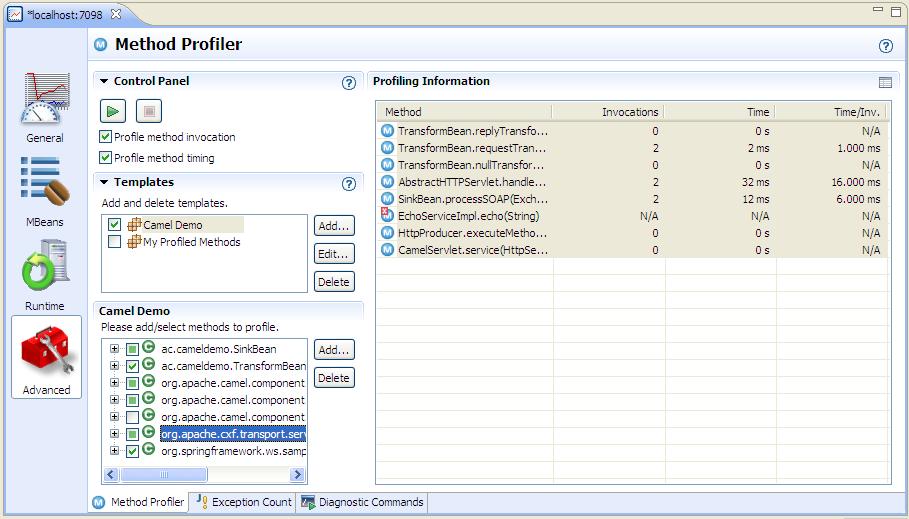
Creating profiling traps in JRMC is fairly simple - go to the 'Advanced' view in the console and click the 'Add...' button under 'select methods to profile. JRMC will ask you for the class name. Assuming that the class is found, it will then allow you to select the methods that you want to profile.

Once the methods are selected, you need to click the 'Start Profiling' button (green triangle) to start capturing data. You should see something like the screenshot below.


Profiling traps can be used to get a more detailed picture of where response time is being sent. They are more complex to set up than JMX and probably incur some measurement overhead. They do have one other big drawback - they are based only on class and method, so you won't be able to separate out the stats for different component instances if you have a number of routes using the same type of component. For all of these reasons, method profiling is probably best restricted to very targeted tests in which you can focus your workload and your profiling traps purely on a small area of interest.

Sunday, 31 October 2010

JRockit Mission Control vs Wily

We’ve been using CA Wily Introscope to monitor one of our production systems for a couple of years. It has been very useful in providing a detailed insight into what is going on with the Java tier including the ability to look back in time and do root cause analysis after a problem has happened.

In particular, we use Wily to monitor the throughput and response time of our ‘front ends’ (servlets, EJBs etc), the ‘back end’ (JDBC calls) as well as keeping an eye on key JMX metrics such as the number of messages in JMS queues and the behaviour of the heap and garbage collector. All in all, it’s a very useful tool that I wouldn’t like to be without.


Another customer that I’ve been working with more recently has suggested either Wily or Oracle JRockit Mission Control (JRMC) as monitoring solutions. I’ve mostly worked with the Sun JVM until now so I didn’t know much about JRMC. I decided to try to figure out how it stacked up against Wily.


This post is about my first impressions of JRMC and its suitability for my own needs. I wouldn’t claim that it’s a comprehensive comparison, so please forgive any errors or omissions.

Pros
  • It’s much easier to get a copy of JRMC than Wily
  • No interceptor setup needed
  • Easier to use for a 'quick look'
  • Probably a better tool for general profiling when you’re not sure where a performance issue might be
  • I like the ‘wait events’ profiling – this seems rather similar to what an Oracle AWR report shows in the database… it remains to be seen whether it proves as useful in the Java tier.
  • Looks like it has some useful features for diagnosing memory leaks, but I’ll reserve judgement until I’ve used them on a real life problem.
  • Can trigger thread/heap dumps etc from the same console
  • Probably better targeted garbage collection visibility for JRockit
Cons
  • Many features only work with the JRockit 1.6 VM
  • It doesn’t seem to support the notion of a centralized permanent data repository
  • Without a data repository, I suspect that any long term trend reporting will be very difficult
  • It doesn’t seem to have the capability to build ‘traffic light’ dashboards and drill down from these to the detailed monitoring data
In summary, I think that both Wily and JRMC are useful tools. JRMC probably scores more highly on more detailed JVM analysis and ease of getting started. Wily does a better job of monitoring a production system and historical trend reporting.

My first choice would be to have both tools available. If I had to choose between them I’d probably stick with Wily for production system monitoring and possibly go for JRMC for monitoring performance tests.

Tuesday, 14 September 2010

Capturing Local Network Traffic on Windows

I often find myself using a network packet sniffer to capture traffic between two network applications. This can be a very powerful technique, both for debugging and for diagnosing performance issues because it shows exactly what is happening on the wire without any need for debugging or logging code in the application and without any room for doubt that the debugging code may itself be causing a problem or not showing the issue.

One serious limitation with this technique is that it is not usually possible to monitor traffic between two applications running on the same Windows machine. I think that the reason is that the Windows loopback adapter doesn’t support packet sniffing. This is rather a pain for me because I quite often want to look at two network applications ‘in captivity’ by running them on my laptop.

Until recently I had just accepted this limitation and found other ways around it such as using another machine to run one of the applications, but this needs extra effort to get the application working on another machine. Sometimes I simply abandoned the packet sniffing route and tried to solve the problem using other techniques.

I recently wanted to monitor and debug some Oracle database link traffic. Installing Oracle on another machine was really going to be overkill so I spent some time thinking about other ways to see the traffic.

I figured out a very simple way around the problem that allows packet sniffing without installing one of the applications on a different machine. The basic principle is to make the network traffic from the client go to a different machine and then have that machine send the traffic back to the target application. This forces the traffic between the two applications ‘onto the wire’ where it can be captured by a packet sniffer (Wireshark in my case). In my setup the extra machine is running Linux, but it should be possible to adapt this technique for other operating systems.

I tried a couple of ways to do this without success before settling on a really simple answer. The first two ways should also work and may be more suitable in some situations. Having found a simpler way, I didn’t pursue them further, but here they are:-
  1. Use iptables port forwarding to identify the relevant network packets and route them back to the intended host.
  2. Use netcat as an application level proxy configured to open a TCP connection to the target host when it receives an inbound connection and forward traffic in both directions.
The technique that I settled on doesn’t require any clever stuff on the Linux machine:-
  1. Use Putty on the Windows machine to open an SSH session onto the Linux machine and log in.
  2. Create a tunnel in Putty, providing a free port number (let’s say we choose 8521) on the Windows machine as the ‘source port’ and the IP address of the Windows machine and the real port number of the application (e.g. 1521) as the ‘destination’
  3. Reconfigure the client application to talk to localhost:8521
  4. Set up the packet sniffer to capture network traffic on the real application port number (1521).
  5. Run the client application and watch the packets arrive.
The screenshot below shows the Putty settings window with the tunnel info being set up. Don't forget to click the 'Add' and then 'Apply' buttons or else it won't work.


This works because Putty listens on port 8521 on the Windows box, sends all traffic received over to the Linux box via its SSH connection and then opens a connection from the Linux box back to port 8521 on the Windows box. The server application and packet sniffer both see a connection coming from the Linux box and send all responses back the same way, even though the client is really on the Windows box.

Step 3 is of course very dependant on the client application. In the case of a database link the ‘client’ is actually an Oracle database instance. I had to set up an extra aliased entry in tnsnames.ora and create a database link to talk to the aliased TNS name instead of going direct to the real target instance.

Friday, 13 August 2010

An End in Sight to Upgrade Downtime?

One of the recurring concerns that our customers raise with us is the amount of downtime required when we make a change to the application.

We have spent time and money putting a bunch of high availability technologies in place so it always seems disappointing to have to ask for downtime to do something as simple as an application code change. Somehow this fairly frequent activity has not caught the attention of the folks who think up clever new ways to improve database availability... until now.

In our case the application is a Telecoms inventory solution based on the Amdocs Cramer product using J2EE (WebLogic or Oracle App Server) and an Oracle database. The product is very 'database heavy' in that a large proportion of its code resides in the database as Oracle stored procedures or database resident Java code. The complexity of the dependencies inside the product means that any changes typically require an outage of several hours while the database code is replaced and recompiled.

We have looked at various ways to solve this problem. The main option being to run multiple instances of the application and replicate data changes between them somehow. When upgrade time arrives, one instance can be used to apply the code changes while the other stays online running transactions and the data changes are replicated across before the instance with the updated code takes over as the live instance. We've looked at Oracle streams, Data Guard SQL Apply and GoldenGate as possible solutions. All of them seemed to offer the possibility of doing the job but somehow the complexity and cost always meant that the idea was never followed through to implementation.

There is now another way to achieve the same result - without the need for a separate instance of the application. Oracle 11g release 2 has introduced a feature called 'Edition-Based Redefinition'. The new feature allows multiple versions of the same procedure to exist in the database so that clients can carry on using the old version while the new one is being built. The new versions can also be kept
separate during testing and if necessary even run in parallel for longer periods of time.

Edition-Based Redefinition is probably still some way in the future for us at the moment - I think it will need changes by our product vendor, not least that they need to support Oracle 11g.

Some links containing more detail:-

A 2 part YouTube video with Bryn Llewellyn
Part 1
Part 2

Tom Kyte's very thorough explanation of Edition-Based Redefinition
Part 1
Part 2
Part 3

Bryn Llewellyn's White Paper

The Manual

Friday, 30 April 2010

Memory Leak Case Studies Part 3

The third and final installment (probably) in the series on memory leak case studies describing real memory leaks and similar Java heap stress conditions that I’ve seen myself and how they were tracked down and fixed.

This particular issue took a long time to resolve because it wasn't in code that we controlled and tracking down information about the problem proved very difficult.

weblogic.jms.dd.DDMember

After clustering our WebLogic 9.2 servers we found that the managed servers would run into major heap stress and sometimes go offline on some of our test environments. Unfortunately the problem was not easily reproducible and didn't seem to happen on environments that we could easily mess with.

A heap histogram from jmap looked like...

255076744 2969890 char[]
71728608 2988692 java.lang.String
34196104 287745 * ConstMethodKlass
30874880 385936 weblogic.jms.dd.DDMember
20721808 287745 * MethodKlass
18528600 772025 weblogic.jms.common.JMSID
18527736 771989 weblogic.messaging.dispatcher.DispatcherId
15454080 386352 weblogic.cluster.BasicServiceOffer
14538712 24883 * ConstantPoolKlass
12604000 259169 * SymbolKlass
10601304 24883 * InstanceKlassKlass
9763528 29806 byte[]
9262056 385919 weblogic.jms.dd.DDMemberStatusSharer
7797008 18852 * ConstantPoolCacheKlass
6628720 118370 org.codehaus.groovy.runtime.metaclass.MetaMethodIndex$Entry
6175856 385991 weblogic.jms.common.JMSServerId

We also got some heap dumps, but it was pretty obvious from the outset that the memory leak related to WebLogic internal classes. We checked and ruled out the obvious things that were under our control (e.g. too many messages building up in JMS queues). We also googled for the problem and searched Oracle Metalink but didn't turn up any useful advice. The only option left was to raise a case with Oracle, which is what we did.

Oracle responded to the case with the advice to increase the heap size to 2Gb on all servers. We did this and our test environments became more stable. the problem did not recur in test so eventually the clustering changes made it into production.

I'm sure that you can guess where this story is going ...

After clustering went live we found that the managed servers would stay up for roughly 24 hours before running into problems and needing to be restarted. The initial symptoms that were noticed were BEA-000115 messages (which say that a multicast packet was lost) and BEA-000511 messages (which say unsolicited reply), along with high CPU utilisation.

Naturally a new Oracle case was opened. Initially it was thought that the problem was being caused by a poor choice of multicast addresses. Another week went by while the system was reconfigured with what seemed to be better multicast addresses, but still the problem remained.

I did some analysis of the logs using Splunk (a great tool BTW, but that's another story) and found that the messages seemed to appear in bursts starting an hour or two before the CPU utilisation became really high. Here is a Splunk graph showing the occurrences of one of the message types.


I'd also asked for jstat data which confirmed that the servers were filling up their heaps. I also found that the WebLogic logs contained some BEA-310002 messages that shed some light on the behaviour of the problem over a longer period. I used splunk to produce a graph from these:-


This graph seemed to indicate that the problem was related to the uptime of the servers rather than the amount of work they were doing (the behaviour was the same on a Sunday as on a working day). This prompted an idea for improving the stability of our system - avoid restarting all of the servers at the same time and then there would be a good chance that they wouldn't all fail at the same time. Unfortunately the change control procedures for the production system pretty much ruled this out, so we were stuck with restarting the servers each time they ran into trouble.

Finally Oracle support came back to us with the advice that this was a known bug in WebLogic for which a patch was available - 'BUG 8160383 - [CR368242]'. We applied this fix, tested it and put it into production and found that the problem was solved.

So I then wondered why we hadn't found the cause sooner. The Oracle support people said that the description of the patch said that it fixes "leaking objects weblogic.jms.dd.DDMember". I went back into Metalink and looked up the information relating to the bug and the patch and found that it contained mostly blank text and no mention at all of 'DDMember' which is probably why I couldn't find it. I wonder whether some of the information was perhaps lost in the transition from WebLogic's bug database into Metalink. Clearly the Oracle support people have another source of information available to them.